Verify a domain
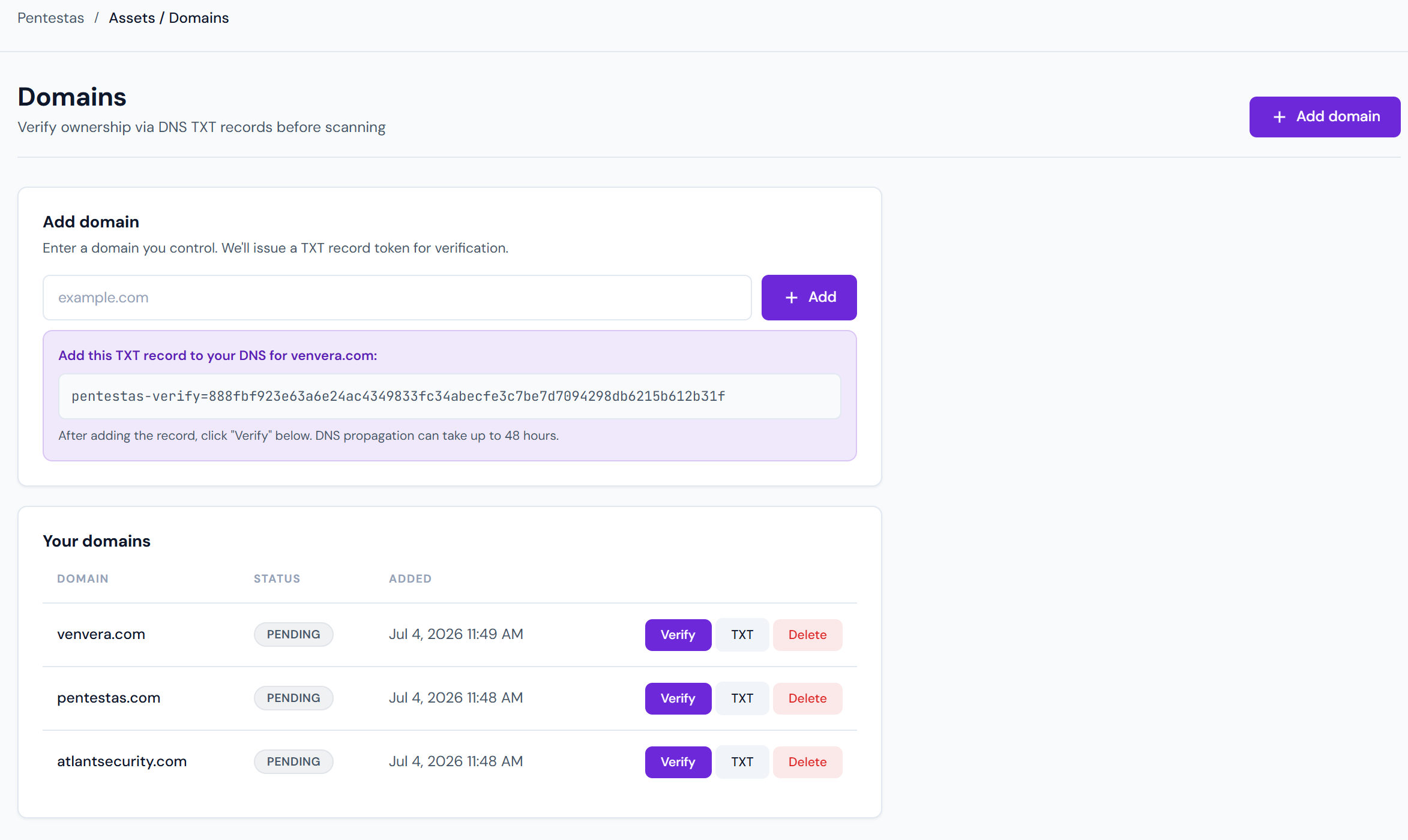
Pentestas will not scan a target until you prove you control it. This is a hard limit, not a policy knob — the scan APIs reject requests for domains that don't have a verified record in your tenant.
Why verification is required
Running an unsolicited vulnerability scan against someone else's property is:
- Computer Misuse Act / CFAA territory — most aggressive scans leave an HTTP fingerprint that stands up in court.
- A compliance hazard — PCI, SOC 2, and most bug bounty programs explicitly require written authorisation.
- An abuse vector — without it, Pentestas becomes a DDoS-by-scan service with our IPs on the wrong end of every abuse report.
Verification takes ~2 minutes and gates the blast radius of the entire platform.
The verification flow
1. Add the domain
Settings → Domains → Add domain.
Enter the bare domain (example.com, not https://www.example.com). A single verified zone covers every subdomain under it, so you don't need to add api.example.com, app.example.com, etc. separately.
2. Receive the challenge token
Pentestas generates a random token of the form:
pentestas-verify=<48-random-characters>
This token is unique to your tenant and this domain. It does not expire, but once verification succeeds you can delete it from DNS — Pentestas re-checks only when you ask it to.
3. Publish the TXT record
Add a new TXT record at the zone apex (@, not _pentestas.example.com):
Host:   @  (apex)
Type:   TXT
Value:  pentestas-verify=<your-token>
TTL:    300
DNS propagation typically takes 30 seconds to 5 minutes. If your provider has a slow TTL, it can be longer.
Multiple providers — Cloudflare, Route 53, Google Cloud DNS, and GoDaddy all look the same for this. Just find "Add record", choose TXT, and paste. You can keep other TXT records at the apex (SPF, DMARC, etc.) — DNS permits multiple TXT records on the same name.
4. Click "Verify"
Pentestas queries your DNS from multiple resolvers. If all return the expected token, the domain flips to Verified and becomes a legal scan target for your tenant.
Verification methods
In addition to DNS TXT, Pentestas accepts:
- Well-known file — upload
pentestas-verify.txttohttps://<domain>/.well-known/pentestas-verify.txtcontaining the token. Handy when you can't change DNS (consultant engagements, sub-subdomains). - Meta tag — add
<meta name="pentestas-verify" content="<token>">to the homepage<head>. Same constraint — works when DNS is out of reach.
Pick whichever you can ship fastest.
Re-verifying
If you change registrars or rotate DNS, Pentestas may drop the domain back to Pending verification on its next periodic check (every 30 days). Re-publish the TXT and hit Verify again.
Multi-domain companies
Enterprise plans support unlimited verified domains. Add as many as you own; each proves control independently. Pro plans get up to 10; Free plans get 1.
If you operate under many domains and want a streamlined onboarding (e.g. 50+ subsidiaries), talk to us — we can enable a unlimited_domains flag on your tenant that bypasses the limit.
Troubleshooting
| Symptom | Likely cause | Fix |
|---|---|---|
| "No TXT record found" | DNS still propagating | Wait 5 min, try again. dig +short TXT example.com confirms local state. |
| "Token mismatch" | Pasted the wrong token, or pasted a quoted version | Delete the TXT, copy-paste fresh from the UI (no outer quotes). |
| "DNS query timed out" | Your nameserver blocks non-US resolvers | Temporarily lower TTL and try again; contact us if the block is intentional. |
| Verification succeeds, scans still blocked | You're a demo user | Demo accounts can only scan demo.com and similar canary targets; upgrade to remove this. |