Your first scan
This page assumes you've verified a domain. If not, do that first — the UI will block you otherwise.
Start it
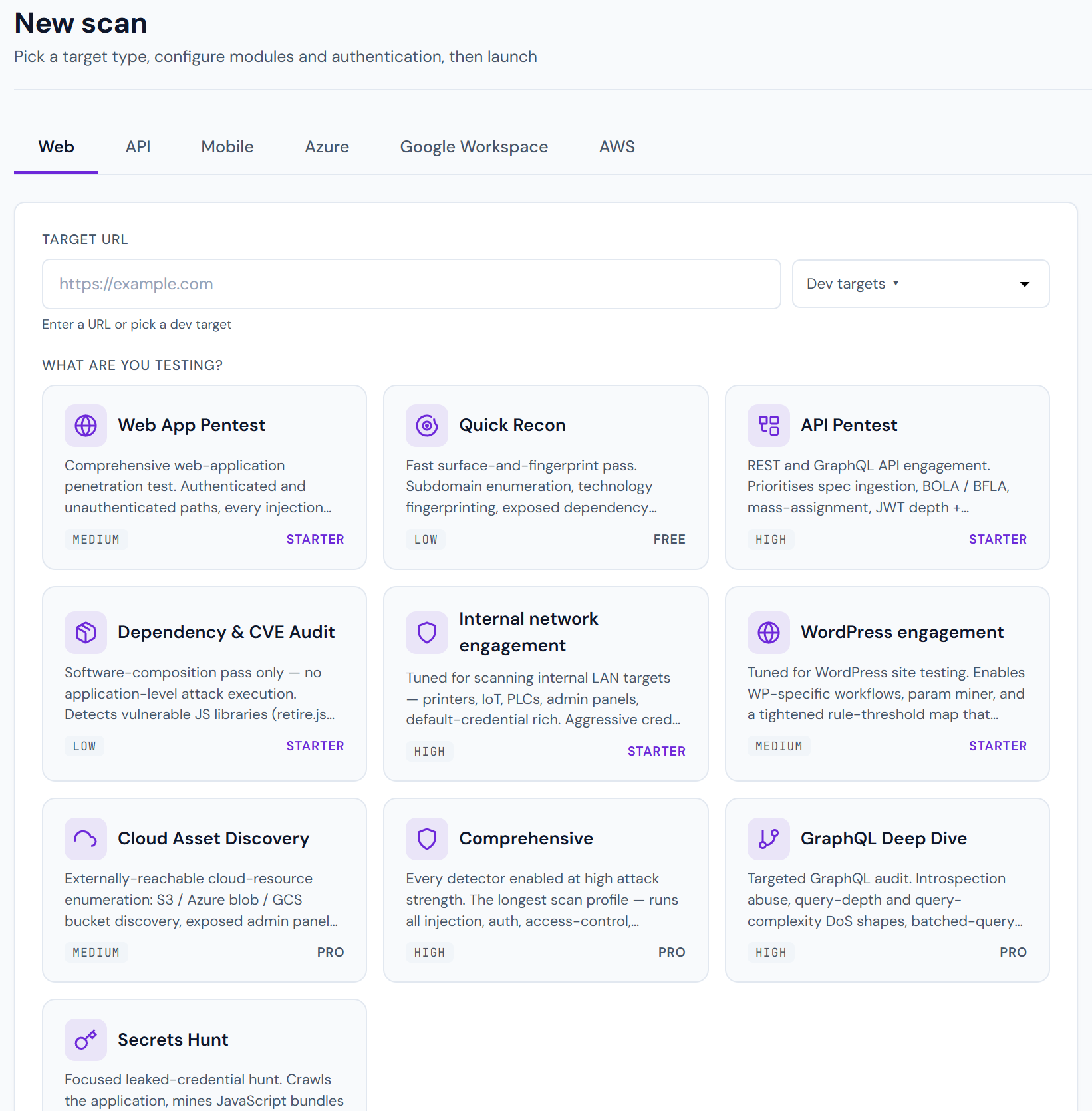
Dashboard → New scan. You'll see a form with:
Target
Full URL including scheme. Examples:
https://app.example.com— scans the root.https://app.example.com/admin— starts the crawl at/adminand proceeds down.https://api.example.com/v2/users— for API scans, point directly at a sample endpoint or upload an OpenAPI spec.
Scan types
Pick one or more. The defaults cover the 80% case:
| Type | What it does |
|---|---|
| Web app | SQLi, XSS, CSRF, auth, IDOR, SSRF, open redirects, path traversal, file upload, header injection, clickjacking, CORS, and ~30 more probes |
| API | Endpoint fuzzing, method scanning, BFLA, mass assignment, rate-limit weaknesses, response intelligence |
| Network | Port scan + banner grab + CVE lookup + protocol weaknesses (SSH, TLS, RDP, SMB) |
| Authentication | Default creds, weak password policies, session fixation, JWT weaknesses, OAuth flaw detection |
| Discovery | Subdomain enumeration + directory busting + parameter discovery |
| Cloud | Bucket enumeration across S3/Azure Blob/GCS + public ACL audit |
Pick more scan types → longer scan, but more coverage. A "standard" scan (Web + API + Discovery + Auth) on a small app takes 15–45 minutes.
Advanced options
Clicking Show advanced reveals:
- Authentication — supply cookies, Authorization headers, or OAuth refresh tokens so Pentestas can scan behind the login page. See Authenticated scans.
- Custom headers — inject a
X-Scan-Source: pentestasheader to help your SIEM distinguish scan traffic from real attackers. - Scope restrictions — exclude specific paths (e.g.
/logout,/admin/delete). - Crawl depth — default 3 (homepage + 3 clicks). Pro/Enterprise can raise this.
- AI analysis — on by default for Pro/Enterprise. Triggers Claude-powered validation + narrative generation after the raw scan.
- Scan mode — Internal Engine (modules only) or + AI assist (hybrid: modules + workbench investigation). See Scan modes.
What happens next
Phase 1: Fingerprinting (~30s)
Pentestas identifies your stack: framework (React, Angular, Rails, Django, Flask, Laravel, ASP.NET), web server, CDN, WAF, login technology (Auth0, Firebase, Cognito, self-hosted), API style (REST, GraphQL, gRPC, SOAP). This feeds into payload selection — no point firing Rails-specific probes at a Node app.
Phase 2: Crawling (~2–10 min)
The crawler maps your attack surface: every reachable URL, every form, every parameter, every JS bundle with API calls, every WebSocket endpoint, every iframe.
During this phase you'll see the URL list grow in real time. You can already send operator hints (e.g. focus: /admin/) from the scan detail page.
Phase 3: Attack surface analysis (~30s)
Pentestas picks which modules to run based on what the crawler found. Auth tests only fire if we detected a login form; SSRF probes only fire on parameters that look like URLs; GraphQL probes only fire on /graphql-style endpoints.
Phase 4: Payload testing (~5–30 min)
The hot loop: every selected module runs against every applicable endpoint. Findings stream in live as they're confirmed. Each finding gets a proof status as well as severity.
Phase 5: Workbench agent (hybrid / + AI assist only)
If HIGH or CRITICAL leads exist, Claude investigates with the same tools you have on the scan tabs — HTTP history, Forge, Volley, OAST — and may pivot into cloud recon. See AI workbench.
Phase 6: AI analysis (~1–3 min, Pro+ only)
Claude re-examines the raw findings: flags false positives, generates plain-English impact narratives, proposes remediation, and synthesises attack chains by linking findings into multi-step compromise paths.
Phase 7: Report generation (~30s)
A rendered HTML report is assembled (and PDF/DOCX/JSON on demand). See Report formats.
Following along
Once a scan is running, the Scan detail page shows:
- Live phase + progress message
- Findings as they're persisted, ordered by severity
- An Attack chain mindmap (Pro+) that expands in place as new chains are synthesised
- Streaming logs if you click Show verbose
You can leave and come back; the WebSocket reconnects and replays the last 2 hours of events from the Redis buffer so you never lose live data.
Cancelling or pausing
Scans can be cancelled mid-run. Pentestas captures a checkpoint every phase boundary, so you can resume from the same place later with Resume scan on a paused scan.
What's a "good" scan?
- Zero findings is possible — mostly on greenfield apps behind a strict WAF. Double-check by looking at coverage: did the crawler find everything you expected? If yes, you're probably genuinely clean on the scanned surface.
- 3–10 findings at LOW/INFO is normal for a well-hardened production app (CSP misconfigs, missing HSTS, overly-verbose error pages).
- HIGH or CRITICAL warrants investigation right now. Always check the validation status and the proof-of-exploitation section before paging on-call.
Next
- Reading results — scan overview page walkthrough.
- Severity scale — what CRITICAL, HIGH, etc. actually mean.
- Attack chains — the thing that makes Pentestas different from a legacy scanner.